skip to main |
skip to sidebar
Infos. Tricks. How To. Tips.
July 17, 2010 10:50 PM
Huwah, anda boring? Ya aku pun. Hahah. Takpe, dikala anda boring ini, mari aku share sesuatu yang akan mengurangkan sikit keboringan anda itu. Rasanya benda ni dah lama orang tahu, tp tapelah, aku saje share. Sharing is sexay kan? Okeh sudah, mari sini nak cerita. Pernah anda terfikir apa lagi yang boleh anda buat dengan Google? Nak menonton webcam dari mana-mana webcam yang ada kat celah-celah dunia ini? Mari anda cuba menaip ini kat Google. Keyword nya selepas Read More dibawah:

April 29, 2009 6:22 PM
CPF Motorsport Website - Project to pass
Project Name: Joomla Ecommerce
Website For : CPF Motorsport
Searching For : Whoever expert in using Joomla and you'll get pay for it.
Objective: Setup a database and complete the ecommerce setting using Virtuemart. No need to design a new layout.
Payment: RM500
Info: Contact me as soon as possible, only one person needed. If anything to ask for, do not hesitate to contact me either thru email: kikiartdesign@live.com or just shout in Shoutbox. Many thanks.
March 30, 2009 4:45 PM
The New Look of Kikipunyablog! Presenting Version 2!
Theme Name: K! V2
Design: Adobe Photoshop CS2
Coding: Mic. Frontpage 2003 + notepad
Timeline: 3 Days
February 1, 2009 11:27 PM
Computer desktop is a very personal thing. Each of us has a personal preference how our desktop should looked like. Modding (customizing) a desktop can be as simple as changing the desktop wallpaper, or messing with the default icons. It can also go as far as tweaking the entire navigation as well as the look and feel.
Here’s a showcase of 40 Great Computer Desktop Mods that highly represent each user’s personality together with explanations on the applications, icon sets used. Full list after jump.
The Enigma Desktop
Comes with RSS reader, Gmail Notifier, Calender, Application launder and many other interesting stuff. Windows Vista desktop refreshed with Kaelri’s Enigma. Author explain it is done.
Winter Desk
Exellent Windows Vista mod using WindowsBlind’s Abcisse Vista created by amaeli.
Windows Strata
Author prefers to call this Windows Strata. The idea is that this new OS will bridge the gap between the Internet and your desktop. A completely redesigned OS tailored to fit your Internet surfing needs.
When Quicksilver meets Aero
Windows XP with a great silver theme look and feel.
Royal Mod Theme
Something similar to the default Windows XP theme, but a more enhanced version utilizing Royal Inspirat Mod, Object Dock and Desktop X.
Info By and Credits To: Hongkiat
Tags: 5 Great Computer Desktop Mods, Computer Desktop Modification, Beautiful Desktop, Info
January 26, 2009 2:57 AM
How To Back Up The Registry WinXP
Before you edit the registry, export the keys in the registry that you plan to edit, or back up the whole registry. If a problem occurs, you can then follow the steps how-to restore the registry to its previous state.
How to Export Registry Keys
Step 1
Click Start, and then click Run.
Step 2
In the Open box, type regedit, and then click OK.
Step 3
On the File menu, click Export.
Step 4
In the Save in box, select the boxs at the bottom the bottom according to weather you want to export all or only selected branches of the registry.
Step 5
Next select a location in which to save the backup .reg file. In the File name box, type a file name, and then click Save.
How to Restore the Registry
Last Step
To restore registry keys that you exported, double-click the .reg file that you saved.
January 22, 2009 11:50 PM
How To Increase Download Speeds By 100-200 Kbsec
Wondering how to increase your download speed? Follow this step
Step 1
First of all download this program:
http://www.speedguide.net/files/TCPOptimizer.exe
Step 2
Install this program.
Step 3
Run in then goto General Settings and set up the
Connection Speed Set to any numbers your like. I choose to set 1500kbs.
Step 4
Choose your Network Adapter in Network Adapter
Selection.
Step 4
Tick Optimal Settings, then Apply Changes.
Final Step
You need to reboot your computer then of course! Test you download speed!
Enjoy the speed!
1:49 AM
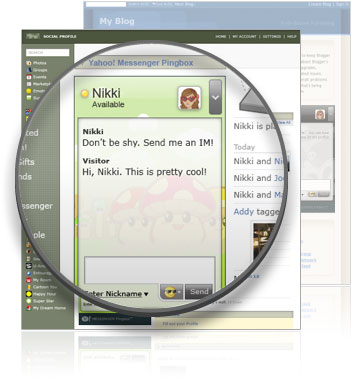
Setup Yahoo Messenger Pingbox! (required flash player
10)1. Enter to this site http://messenger.yahoo.com/pingbox/
2. Then click 'Create a Pingbox'
3. Now you in Pingbox Page
4. Choose the Background Theme for your new Y!
Pingbox.5. After that you need to insert Display Name
9. Tick 'Require visitors to enter Nickname to send
IM'11. Done? Then just hit Save button
12. New window will open automatically, and you need to enter a username and
password at your Y! account.13. Done!. Click 'Copy to Clipboard' then paste it in your
website.
Info: Download Yahoo! Messenger 9.0 (for Windows) to take advantage of all the Pingbox features.
Source: Yahoo Messenger Pingbox!
Tags: Yahoo Messenger Pingbox, YM, Chat with visitors, Download Yahoo Messenger 9.0
January 21, 2009 2:52 PM


Windows 7 includes a number of new features, such as advances in touch, speech,
and handwriting recognition, support for virtual hard disks, improved
performance on multi-core processors, improved boot performance,
and kernel improvements.Windows 7 adds support for systems using multiple heterogeneous graphics cards from different vendors, a new version of Windows Media Center, Gadgets being integrated into Windows Explorer, a Gadget for Windows Media Center, the ability to visually pin and unpin items from the Start Menu and Taskbar, improved media features, the XPS Essentials Pack being integrated, Windows PowerShell Integrated Scripting Environment (ISE), and a redesigned Calculator with multiline capabilities including Programmer and Statistics modes along with unit conversion.
Many new items have been added to the Control Panel including: ClearType Text Tuner, Display Color Calibration Wizard, Gadgets, Recovery, Troubleshooting, Workspaces Center, Location and Other Sensors, Credential Manager, Biometric Devices, System Icons, Action Center, and Display. Windows Security Center has been renamed the Windows Action Center (Windows Health Center and Windows Solution Center in earlier builds) which encompasses both security and maintenance of the computer.
The taskbar has seen the biggest visual changes, where the Quick Launch toolbar has been merged with the task buttons to create an enhanced taskbar or what
Microsoft internally refers to as the "Superbar". This enhanced taskbar also
enables the Jump Lists feature to allow easy access to common tasks. The
revamped taskbar also allows the reordering of taskbar buttons.Screenshots have appeared demonstrating a new feature called 'Peek'. Peek is a quick way of making all visible windows transparent for a quick look at the desktop. A Microsoft spokesman said that "this will be useful for users who want a quick
look at the news" in reference to RSS gadgets on the desktop.Unlike Windows Vista, window borders do not turn dark when maximized when
Windows Aero is applied. Instead, it remains in Aero Transparency even when
maximized in Windows 7.For developers, Windows 7 includes a new networking API with support for building SOAP based web services in native code (as opposed to .NET based WCF web services), new features to shorten application install times, reduced UAC prompts, simplified development of installation packages, and improved globalization support through a new Extended Linguistic Services API.
At WinHEC 2008 Microsoft announced that color depths of 30-bit and
48-bit would be supported in Windows 7 along with the wide color gamut scRGB
(which for HDMI 1.3 can be converted and output as xvYCC). The video modes
supported in Windows 7 are 16-bit sRGB, 24-bit sRGB, 30-bit sRGB, 30-bit with
extended color gamut sRGB, and 48-bit scRGB.Windows 7 adds online versions of Spades, Backgammon and Checkers.
2:53 AM

1. Gmail - Free Email Service
Website: gmail.com
Gmail which is most powerful email service and the best email service
and providing you free service. Currently they has around 6 GB space with chat
service from inbox. Also filtering, leveling, vacation alerts, web clips,
powerful spam protection, sent mail archives, IMP service and much more funs. As
well as, from gmail you can signin to AIM accounts and all things are ajax
based. You can transer 17MB attachments files to your gmail friends.
2. GMX - Free Email Service
Website: gmx.com
GMX which is providing free email accounts with 5 GB storage space and also
supporting text, photos, music, videos, files sharing, Data reside on servers in
a high-powered computer center, higly protected email security, regular
backed-up, SSL Secured connection and guest accessing featured. Fully ajax based
and both html/text format available, email archives, auto responding, filtering
and much more things.
3. AIM - Free Email Service
Website: aol.com
AIM Mail, AOL’s free web based email service with unlimited online storage and
powerful spam protection and user friendly email management system. You can chat
with you friends from inside and also POP, IMAP features enabled. You can browse
AIM from your mobile browser. AIM has easy calender management system, events,
to do list creating also available in right panel. AIM has some limitation and
sometimes ads annoying to users.
4. Yahoo! Mail - Free Email Service
Website: yahoomail.com
Most recently yahoo emailed ajax based chat service from inbox and as well as rss features, read more emails without page refreshing. If you’re slow internet user, might be you have to face some problem. Also yahoo! junk mail service and currently they monetize every spam carefully and taking and blocked the spammers. Yahoo! has free Instant Chatting service or IM service and millions of user using everyday
and continous stay on online, sharing files, photos, musics, videos and much
more funs. Yahoo! has limitations that a user’s email address can expired if he
don’t log-in long times.
5. Windows Live Hotmail - Free Email Service
Website: hotmail.com
Windows live hotmail which is providing free email service with 5 GB space
and fast searching, solid security and supporting desktop email programs. As
well as, ajax based service with filtering system, spam protection and
signatures and much more fun.
6. Inbox.com - Free Email Service
Website: inbox.com
Inbox dot also providing free email service with 5 GB storage. For
more security purpose, if have to use your mobile phone for email accounts
verification. They has filtering, not so powerful spam protection service. But
they has great limitation. If you don’t log-n long time, they will expired your
email address and erase all of your mails and contacts. Also you will huge spam
within a days and even slower to open the mail box and where people aspect
faster email service without spam.
7. Zapak.com - Free Email Service
Website: zapak.com
providing free email service with unlimited space and with rich interface.
You can’t access zapak mail inbox with the use of IMAP. Folder organizing, email
searching and ads attachments with every mails which sometimes annoying users.
Zapak also famous for gaming zone and they arranging many games for their user
to earn money to playing games.
8. Rediff.com - Free Email Service
Website: rediff.com
Reddif.com which is providing unlimited storage with IM service. You can
chat instantly from inbox, send SMS service, email alerts on mobile phones,
email searching, bulk mail controlling, sent mails archives, spam reporting
features enabled. Also you can use Briefcase 30 MB for files storage with POP3
access features. On right panel ads sometimes annoying users and also at the top
of the mail, they using some ads which confused peoples.
9. Gawab.com - Free Email Service
Website: gawab.com
Fastest and cool free service with 2 GB space and POP access enabled and
Gawab.com has folder system and powerful spam filters. Gawab has no access in
IMAP. Currently they as 5397494 user and much more inside Gawab.com
10. BigSting.com - Free Email Service
Website: bingsting.com
Bigstring.com which is providing free email service with 2 GB space
and highly secured and as well as bigstring.com has not much more smart
organizing tools for incoming emails. POP email features premium users and no
messages leveling system.
January 19, 2009 4:32 PM

Share your thoughts, photos, and more with your friends and the world.Your blog
Easy to use
It’s easy to post text, photos, and videos from the web or your mobile phone.
Flexible
Unlimited flexibility to personalize your blog with themes, gadgets, and more.
So what are you waiting for? Sign Up now!
1:47 PM

Whenever you noticed a contact in your Gtalk/Google Talk has not been online for some time, have it ever crossed your mind you’ve been blocked? If you are curious in finding out who actually blocked you in Gtalk, here’s a workaround you can try.
This following method we attempt to show make use of a chat client call Pidgin.
Click here to download Pidgin chat client. If you already have Pidgin installed, you may skip this step.
You’ll probably start with the below screen. Click the Add button. "Accounts -> Manage Account" will also bring you to the same screen. Let’s add Gtalk to Pidgin.
Clicking Add will allow you to add new Gtalk account. The following two screenshots show what you need to fill up for Basic and Advance tab, pay attention to those highlighted.
With all the settings properly entered, you should be able to connect to Gtalk and load your contacts successfully. Now let’s go find out who blocked you.
When someone blocked you in Gtalk (and other IMs), they appear offline just like your other contacts who are really offline. Right click, click on Get Info, and we’ll see how to differentiate them.
The following image is a comparison of 2 different contacts: Actual offline (left) and Blocked offline (right). If you are blocked, nothing will be display under Buddy Information.

Credit To: Hongkiat
Tags: How To Know Who Blocked You in Google Talk, Google Talk Blocked, How To
January 18, 2009 2:39 AM
 Example Only
January 8, 2009 11:11 PM
When updating AVG 8.0 today, I received the error "Invalid Update Control CTF File". The error could be fixed easily.
Solution:
You need to rename/remove the CTF temp files in C:\Documents and Settings\All Users\Application Data\Avg8\update\download…. Dont delete all the .bin files in there unless you want to re-run all updates since your original installation (reinstallation seems to cause a problem in IEs Link Scanner which causes IE to Crash). Only rename/remove the avginfo files that end with .ctf.
There were two .CTF files (avginfoavi.ctf and avginfowin.ctf) in that folder, and deleting them fixed the problem indeed.
November 29, 2008 4:48 PM

Riding the surging price of Berkshire Hathaway stock, Buffett has seen his fortune swell to an estimated $62 billion, up $10 billion from a year ago.
Gates is now worth $58 billion and is ranked third richest in the world. He is up $2 billion from a year ago, but would have been as rich--or richer--than Buffett, had Microsoft not made an unsolicited bid for Yahoo! at the beginning of February. Mexican telecom mogul Carlos Slim Helú now ranks as the world's second richest person with a net worth of $60 billion.
1. Warren Buffett
2. Carlos Slim Helu
3. Williams Gates II
4. Lakshmi Mittal
5. Mukesh Ambani


 Fullname: Ikram Faidzal B Hassan
Nickname: Kiki
Fullname: Ikram Faidzal B Hassan
Nickname: Kiki


